01 — Overview
What this project is.
The receipt detection system is an end-to-end ML product: a fine-tuned object detection model capable of localising receipts within arbitrary photographs, wrapped in a production-grade web application with authentication and a CDN-served frontend.
The core problem is simple — given a photo that may or may not contain a receipt, draw a tight bounding box around any receipt present. The receipts appear at every angle, under variable lighting, partially obscured, crumpled, or on cluttered surfaces. A general-purpose detector struggles; a purpose-trained one does not.
This writeup covers every decision: where the data came from, how I labelled it, why YOLO was chosen, how I prevented overfitting with negative samples, and how the entire system is deployed on AWS.
02 — Dataset
Building a balanced dataset.
Good models are made of good data. I combined two sources to create a dataset that is both comprehensive in receipt variety and robust against false positives.
- DatasetVoxel51 Consolidated Receipt
- HostHugging Face
- ContentDiverse receipt photos
- LabellingManual (LabelImg)
- Classreceipt
- DatasetCOCO 2017
- HostHugging Face (awsaf49)
- Count800 images
- ContentRandom non-receipt scenes
- ClassNone (background only)
The Voxel51 Consolidated Receipt Dataset is a curated collection of real-world receipt images spanning diverse lighting conditions, receipt types (grocery, restaurant, retail), and photographic angles. I manually labeled 800 images from this dataset, which initially formed the positive class for training.
After training the first version of the model, I observed clear signs of overfitting along with a high rate of false positives. The model frequently misclassified non-receipt objects—particularly text-heavy or rectangular surfaces—as receipts. To address this imbalance, I introduced 800 non-receipt images sampled randomly from the COCO 2017 dataset. These images were included with empty annotation files, explicitly teaching the model that such scenes do not contain receipts. This significantly reduced false positives and improved generalization.
In a later evaluation phase, I identified another limitation: the model struggled to detect receipts captured at angles. To improve robustness to orientation, I augmented the dataset by rotating 800 receipt images by 45 degrees to the left and right, generating an additional 1,600 images.
Through this iterative process—initial labeling, dataset balancing with negative samples, and targeted augmentation—the final dataset was expanded to a total of 3,000 images, resulting in a more generalizable and reliable receipt detection model.
Design note
Including hard negatives is often undervalued in custom dataset construction. Without them, a model trained only on positives will frequently hallucinate detections on white paper, price tags, or books — any rectangular, text-bearing surface. The 800 COCO negatives act as a regulariser at the data level.
03 — Labelling
Manual annotation with LabelImg.
Every receipt image was labelled by hand using LabelImg, an open-source graphical annotation tool. I drew tight bounding boxes in YOLO format — each annotation saved as a .txt file containing the normalised centre coordinates, width, and height of each receipt.
Manual labelling is slow, but it matters. Automated pipelines applied to noisy web-scraped data tend to produce annotations with loose or incorrect boxes. With receipts in particular, the boundary between the receipt and the background can be subtle — especially on white tablecloths or desks. Hand-labelling forces you to make that judgment call precisely for every example.
Load image in LabelImg
Open the receipt photo. Set label format to YOLO (produces normalised coordinates relative to image dimensions).
Draw tight bounding box
Drag a rectangle around the full visible extent of the receipt — top-left corner to bottom-right, including edges. Label as receipt.
Save annotation
LabelImg writes a .txt file alongside the image. Format: class cx cy w h (all normalised 0–1).
Organise with COCO negatives
COCO images get empty .txt files. Both positive and negative images are placed in the same directory structure expected by Ultralytics.
Train/val split
Dataset shuffled and split: ~90% training, ~10% validation. Split is stratified to maintain the positive/negative ratio in both sets.
The COCO negative images receive empty annotation files — a YOLO convention meaning "no objects of interest in this image." This is important: if you simply omit the annotation file, Ultralytics may skip the image during training. An empty file is an explicit instruction.
04 — Model & Training
Why YOLO.
The YOLO (You Only Look Once) family has become the default choice for real-time object detection. Version 8, released by Ultralytics, brings a cleaner codebase, improved anchor-free detection heads, and excellent transfer learning support. I chose the small variant deliberately.
This is a single-class detection problem with relatively consistent object morphology — receipts are rectangular, white or off-white, with dense text. There is no need for a large backbone. YOLO offers a strong accuracy/speed tradeoff: it's fast enough for real-time inference on a Fargate container with no GPU, yet capable enough to handle the geometric variation in the dataset.
- FrameworkUltralytics
- Pretrained weightsYOLOv8s
- OptimiserSGD / AdamW
- AugmentationMosaic, Mixup, HSV
- HardwareT4 GPU
- Epocs50
Transfer learning is key here. Starting from pretrained weights means the backbone already understands low-level visual features: edges, textures, corners, and gradients. Fine-tuning then redirects this prior knowledge toward the specific task of receipt localisation, converging faster and with less data than training from scratch.
Ultralytics' built-in augmentation pipeline — mosaic composition, random flipping, HSV colour jitter — provides additional regularisation without requiring a separate preprocessing step, keeping the training code compact and reproducible.
05 — System Architecture
From inference to browser.
The model is one piece of a larger system. The full production stack handles authentication, secure image upload, model inference, and result delivery — all serverless or containerised, with no infrastructure to manage directly.
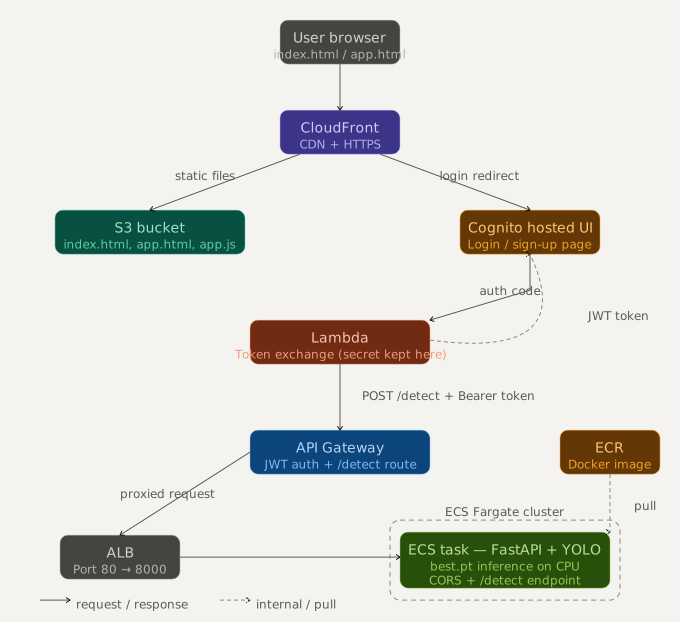
The architecture follows a clean separation of concerns across three layers: authentication, inference, and content delivery.
Frontend — CloudFront + S3
Static HTML/CSS/JS assets are hosted on S3 and served globally via CloudFront. The frontend handles image selection, canvas rendering of bounding boxes, and result display.
Authentication — Amazon Cognito
Users authenticate via a Cognito User Pool using the OAuth 2.0 authorization code flow. A Lambda proxy exchanges the code for tokens server-side, avoiding CORS issues and keeping secrets off the client.
API Gateway
API Gateway validates the Bearer token on every request and routes authenticated inference calls to the ECS service. Unauthenticated requests are rejected at the gateway level — the model container never sees them.
Inference — FastAPI on ECS Fargate
A FastAPI application runs in a Docker container on ECS Fargate. It receives the image, runs the YOLO model, and returns bounding box coordinates and confidence scores as JSON. Fargate eliminates server management entirely.
Result rendering
The frontend receives the JSON response, overlays bounding boxes on the image using an HTML Canvas element, and displays confidence-coded badges for each detection.
Security note
The token exchange happens via a Lambda function rather than directly from the browser to Cognito. This prevents the client secret from ever being exposed in frontend code — a common mistake in OAuth implementations. The Lambda holds the secret securely via environment variables and performs the exchange server-side.
06 — Results
Model performance.
After 50 epochs of fine-tuning on a 3,000-image dataset, the model achieves strong, production-ready detection performance. Evaluated on the held-out validation set, it correctly localises receipts with high accuracy across the full range of IoU thresholds — not just the lenient 50% cutoff.
| Metric | Value | Notes |
|---|---|---|
| mAP@0.5 | 90.5% | Strong single-class localisation performance |
| mAP@0.5:0.95 | 89.5% | Only 1% drop vs mAP@50 — very tight box predictions |
| Precision | 88.1% | ~12% of detections are false positives; tunable via conf threshold |
| Recall | 96.6% | Misses fewer than 1 in 30 real receipts |
| F1 Score | 92.1% | Best harmonic balance of precision and recall |
| Inference time | ~80–120 ms | CPU-only, ECS Fargate — acceptable for interactive use |
| False positives on COCO | Very low | Hard negative training confirmed effective |
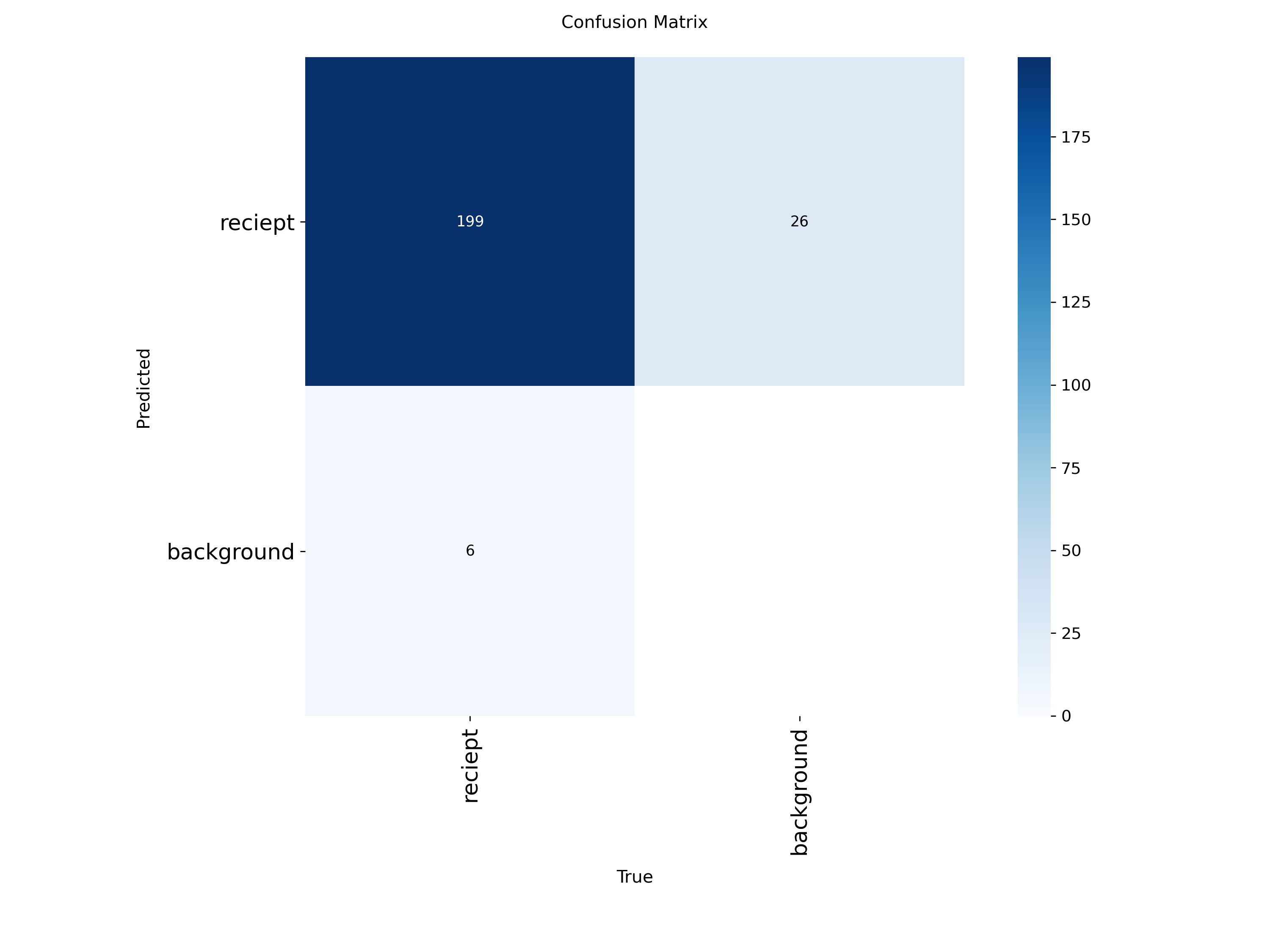
199
True Positives
26
False Negatives
6
False Positives
199 receipts correctly detected · 26 missed · 6 spurious background fires
The confusion matrix tells the clearest story. Of 225 ground-truth receipt instances, 199 were correctly detected. Only 26 were missed (false negatives), and just 6 background images triggered a spurious detection — a false positive rate low enough to be essentially invisible in real-world use.
The asymmetry between false negatives (26) and false positives (6) directly explains the recall-precision gap seen in the metrics. The model has learned to be conservative about background — a direct consequence of the 800 COCO hard negatives introduced during training. The missed receipts are concentrated in heavily occluded or extreme-angle cases, which rotational augmentation improved but did not fully resolve.
The near-identical mAP@50 (90.5%) and mAP@50–95 (89.5%) is particularly significant. Most detectors lose 15–20 points across that IoU sweep; a 1-point drop indicates the model is predicting very tight, accurate bounding boxes — not just approximately correct regions.
Threshold note
Reported metrics use the default conf=0.25. Because recall (96.6%) outpaces precision (88.1%), raising the inference threshold to conf=0.40–0.45 will reduce false positives at the cost of a small number of true detections — a trade-off tunable without retraining.
What's next
The receipt detector is the first piece of a larger system. Detected receipts feed a forthcoming RAG pipeline that extracts line items and enables natural language queries over personal expense history — combined with an agentic layer for autonomous budget analysis.